


Funding for Agri-food Data Canada is provided in part by the Canada First Research Excellence Fund
How Pivot Tables Simplify Analysis of Field Measurements
If you’re working with agricultural or experimental data, Excel’s pivot tables can make summarizing results quick and intuitive. Instead of manually calculating averages or totals for each treatment, you can let Excel do the heavy lifting—organizing your measurements by treatment, cultivar, and replicate automatically.
Suppose you ran a field experiment measuring plant height under different fertilizer treatments and cultivars.
Your spreadsheet might look like this:
| Replicate | Fertilizer | Cultivar | Height (cm) |
|---|---|---|---|
| 1 | Control | A | 42 |
| 2 | Control | A | 45 |
| 3 | Control | A | 43 |
| 1 | High-N | A | 56 |
| 2 | High-N | A | 58 |
| 3 | High-N | A | 57 |
| 1 | Control | B | 39 |
| 2 | Control | B | 41 |
| 3 | Control | B | 40 |
| 1 | High-N | B | 50 |
| 2 | High-N | B | 52 |
| 3 | High-N | B | 51 |
That’s a lot of data points—especially if you have more cultivars or treatments. A pivot table can summarize this instantly.
By default, Excel might show the Sum of height values—but you can change this.
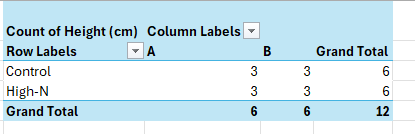
Before jumping into averages, it’s good practice to first check that your dataset is complete.
In the Values field, choose Value Field Settings → Count.
This shows how many measurements were recorded for each fertilizer–cultivar combination.
For example:

If you notice missing or extra counts, you’ll know your data entry needs review before proceeding. This quick check often catches typos or missing replicates that might otherwise distort your summary statistics.
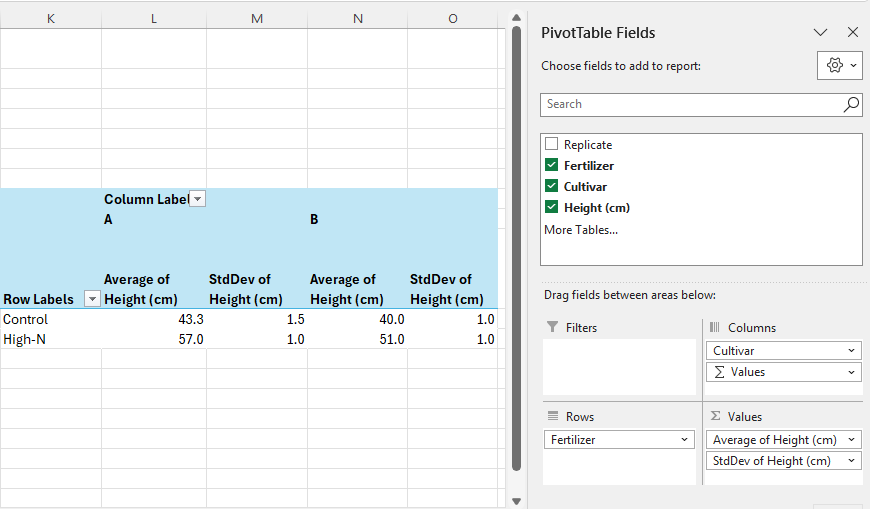
Once the counts look correct:
Your pivot table might now look like this:

To save the data outside of the pivot table, copy the fields and paste as values.
Pivot tables turn raw experimental data into structured insights. In field trials, this means you can check data completeness, summarize treatment effects, and explore cultivar differences—all from the same dataset, all within Excel.
Written by Carly Huitema
Alrighty let’s briefly introduce this topic. AI or LLMs are the latest shiny object in the world of research and everyone wants to use it and create really cool things! I, myself, am just starting to drink the Kool-Aid by using CoPilot to clean up some of my writing – not these blog posts – obviously!!
Now, all these really cool AI tools or agents use data. You’ve all heard the saying “Garbage In…. Garbage Out…”? So, think about that for a moment. IF our students and researchers collect data and create little to no documentation with their data – then that data becomes available to an AI agent… how comfortable are you with the results? What are they based on? Data without documentation???
Let’s flip the conversation the other way now. Using AI agents for data creation or data analysis without understanding how the AI works, what it is using for its data, how do the models work – but throwing all those questions to the wind and using the AI agent results just the same. How do you think that will affect our research world?
I’m not going to dwell on these questions – but want to get them out there and have folks think about them. Agri-food Data Canada (ADC) has created data documentation tools that can easily fit into the AI world – let’s encourage everyone to document their data, build better data resources – that can then be used in developing AI agents.
![]()
image created by AI
When you’re building a data schema you’re making decisions not only about what data to collect, but also how it should be structured. One of the most useful tools you have is format restrictions.
A format entry in a schema defines a specific pattern or structure that a piece of data must follow. For example:
These formats are usually enforced using rules like regular expressions (regex) or standardized format types.
Restricting the format of data entries is about ensuring data quality, consistency, and usability. Here’s why it’s important:
✅ To Avoid Errors Early
If someone enters a date as “15/03/25” instead of “2025-03-15”, you might not know whether that’s March 15 or March 25 and what year? A clear format prevents confusion and catches errors before they become a problem.
✅ To Make Data Machine-Readable
Computers need consistency. A standardized format means data can be processed, compared, or validated automatically. For example, if every date follows the YYYY-MM-DD format, it’s easy to sort them chronologically or filter them by year. This is especially helpful for sorting files in folders on your computer.
✅ To Improve Interoperability
When data is shared across systems or platforms, shared formats ensure everyone understands it the same way. This is especially important in collaborative research.
Using the Semantic Engine you can add a format feature to your schema and describe what format you want the data to be entered in. While the schema writes the format rule in RegEx, you don’t need to learn how to do this. Instead, the Semantic Engine uses a set of prepared RegEx rules that users can select from. These are documented in the format GitHub repository where new format rules can be proposed by the community.
After you have created format rules in your schema you can use the Data Entry Web tool of the Semantic Engine to verify your results against your rules.
Format restrictions may seem technical, but they’re essential to building reliable, reusable, and clean data. When you use them thoughtfully, they help everyone—from data collectors to analysts—work more confidently and efficiently.
Written by Carly Huitema
…and we’re back to the data ownership quandry…
Just when I think I may have heard all the different types of questions and situations that may arise in the context of data ownership – I hear a new one. When I first heard the situation I’m going to share with you in a moment – I thought nah.. this must be a one-off. But then I heard it again from a different individual and situation – so it MUST be a “thing”! When I’m honest with myself, look back, and contemplate my own situations – I’m left wondering too!!!
So let’s work through a research situation. You have been hired onto a project as a graduate student – working towards your MSc. You’re SO excited and happy about this wonderful opportunity you have. You work with your supervisor and lab group to create the most appropriate experimental design to answer your research question, and begin your data collection. You heard about the Semantic Engine and created your data schema to match your data collection. Two years down the road and you’re ready to move on – your thesis is complete and you’ve graduated. What about your data? What do you do with it?
The BIG question here – WHO owns this data? The supervisor – who is the PI on the research project you’ve been hired onto? OR you as the data collector and analyser? Hmmm…… When you think about these questions – the next question becomes WHO is responsible for the data and what happens to it? I would love to hear what readers think about this? Email me at edwardsm@uoguelph.ca if you have an opinion.
OK what are my thoughts? I’ll let you know on my next blog post 🙂
![]()
image created by CoPilot
© 2023 University of Guelph